
A rebar slab calculator is a structured method to estimate bar size, spacing, lap lengths, and quantities for a concrete slab so you can order, fabricate, and pour without waste. For contractors in 370 New Enterprise Way (Woodbridge, ON), Dass Rebar applies this workflow in our in-house estimating to accelerate shop drawings, streamline fabrication, and keep deliveries on schedule.
By Dass Rebar • Last updated: 2026-05-01
Start here: your rebar slab calculator game plan
Use a rebar slab calculator by gathering slab dimensions, loads, exposure class, and concrete cover, then select bar size/spacing, compute lap lengths, and convert totals to straight lengths and bends. Export a takeoff that aligns with detailing and fabrication so material shows up cut, tagged, and ready to place.
This above-the-fold section gives you a clear roadmap. We’ll match how estimators work at Dass Rebar: fast, accurate inputs; clean outputs that fabrication and field crews can trust; and delivery that meets your pour window.
- What you’ll learn: definitions, inputs, steps, examples, and best practices
- Who it’s for: GCs, concrete contractors, developers, and site supers
- Applies to: slabs-on-ground, podium decks, parkades, mezzanines
- Formats covered: welded wire mesh, deformed bar mats, epoxy-coated options
- Outcome: a tight takeoff that cuts rework and keeps pours on time
Quick summary
A rebar slab calculator translates design intent into quantities: bar size/spacing, mats, edge thickening, laps, and waste factors. The fastest path is standardized inputs, a repeatable worksheet, and coordinated detailing—exactly how Dass Rebar’s estimating-to-fabrication handoff works across Ontario jobs.
Here’s the gist you can act on today.
- Inputs: slab area (sf or m²), thickness, design loads, exposure (corrosion risk), cover
- Selections: mesh vs deformed bars; single vs double mat; 10M, 15M, or 20M where needed
- Checks: spacing limits, lap lengths, development, edge thickening, openings
- Outputs: cut lengths, bends, tags, bundles, and delivery sequence
- Sign-off: shop drawings matched to pour sequence to reduce on-deck searching
Local considerations for 370 New Enterprise Way
- Plan for variable spring and fall weather in Woodbridge; sequence deliveries so steel isn’t stockpiled outdoors longer than necessary before a pour window.
- Summer work across Ontario runs hot; confirm early morning delivery slots to beat heat and reduce on-deck delays during vapor barrier and rebar layout.
- Municipal inspections can stack up mid-week; coordinate Dass Rebar detailing submittals so approvals land at least 48 hours before the scheduled concrete arrival.
What is a rebar slab calculator?
A rebar slab calculator is a structured worksheet—digital or analog—that converts slab geometry and design criteria into bar sizes, spacing, mats, lap lengths, and total quantities. It bridges design, detailing, and fabrication so your order, tags, and delivery match field placement without last-minute changes.
Think of it as the translator between drawings and the truck. It captures slab thickness, exposure, bar type, and spacing, then outputs a takeoff that flows into shop drawings and bending schedules. Used well, it prevents common misses like underestimating laps at construction joints or forgetting extra steel at openings.
- Typical inputs: plan dimensions, thickness (e.g., 6 in), cover (e.g., 2 in formed, higher over soil), exposure (corrosion risk), load patterns, openings, and edge conditions.
- Typical outputs: bar callouts (e.g., 10M @ 12 in o.c.), total straight length, bends, laps, accessory counts (chairs/ties), and tagged bundles aligned to pour sequence.
- Where it lives: in estimating tools, Excel/Sheets, or detailing software—then into PDF shop drawings.
At Dass Rebar, we align the calculator with our in-house detailing so the quantities you approve become the exact tags fabrication produces and our trucking fleet delivers across Ontario.
Why a rebar slab calculator matters
It reduces waste, accelerates approvals, and keeps pours on schedule. Standardized inputs prevent omissions; coordinated outputs speed detailing and fabrication; and clear tags reduce on-deck searching. Fewer surprises mean fewer delays and safer, higher-quality slabs.
Construction runs on predictability. Small miscounts ripple: a missed lap length can short a bundle, force a field splice change, or push a pour. A disciplined calculator process creates predictable bundles and accurate shop drawings.
- Fewer RFIs: A complete takeoff anticipates laps, openings, and thickenings so fewer clarifications bounce between site and engineer.
- Faster pours: Tagged, sequenced bundles reduce on-deck handling by minutes per panel—which adds up across 20–50 panels per level.
- Safety lift: Cleaner layout means fewer trip hazards; crew time near slab edges and penetrations drops when steel fits first time.
- Stronger QA/QC: Pre-checked spacing and covers reduce rework risk before inspection or the pour.
In our experience supporting GTA and Ontario projects, consistent calculator-driven takeoffs meaningfully cut rework hours. That shows up as tighter schedules and better mornings on pour day.
How a rebar slab calculator works (step-by-step)
Gather slab geometry and cover, choose bar type and spacing, compute panelization and laps, and convert to tagged cut/bend lists. Validate spacing and edge conditions, then align bundles with pour sequence. Export as shop drawings and delivery notes so field placement is straight ahead.
Use this process on any slab-on-ground or suspended slab. It mirrors how our estimating, detailing, and fabrication flow together.
- Collect geometry: length, width, thickness, drops, openings, and edge thickening. Confirm clear cover and exposure class.
- Select reinforcement format: welded wire mesh for light/medium slabs or deformed bars (10M/15M/20M) for higher loads or tighter control.
- Choose spacing: start from design notes or standard ranges (e.g., 10–18 in o.c.) and validate against crack control and distribution needs.
- Panelize and lap: set bar stock lengths, laps at joints, and staggering. Track laps at edges, joints, and around penetrations.
- Compute totals: total straight lengths, bends, U-bars at edges, extra steel at column strips, and accessory counts (chairs/ties).
- Tag and bundle: assign tag IDs by panel/pour. Group by bar mark so crews can pick and place without sorting chaos.
- Detail and deliver: issue shop drawings; schedule trucking slots aligned to pour windows and crane availability.
Want a head start? See our background explainer on how reinforcement improves slab performance and then fold those principles into spacing and lap decisions.

Types and approaches: mesh vs. deformed bars, single vs. double mat
Choose welded wire mesh for speed and light-duty distribution, or deformed bars for higher loads, tighter crack control, and easier field adjustments. Single mats suit many slabs-on-ground; double mats and column strips support heavier or suspended decks where negative steel is required.
Different approaches excel for different slabs. The calculator helps you quantify the trade-offs and translate them into a clean takeoff.
Welded wire mesh (WWM)
- Common configs: 6 × 6 at 6/6, 9/9, or 10/10 gauges (fast coverage; minimal tying).
- Strengths: speed on wide-open floors; easier to hit production rates on pour day.
- Watch-outs: overlaps must meet the sheet’s effective width; avoid driving chairs through vapor barriers.
Deformed bar mats
- Common sizes: 10M (Ø≈11.3 mm), 15M (Ø≈16 mm), 20M (Ø≈19.5 mm) with U.S. cover/spacing noted on drawings.
- Strengths: flexible field adjustment at penetrations and edges; easier to sequence tags by panel.
- Watch-outs: ensure laps and stagger are captured; don’t let on-site substitutions break spacing limits.
Single vs. double mat
- Single mat: typical for slabs-on-ground with distribution steel (e.g., 10M @ 12–18 in o.c.).
- Double mat: suspended slabs and high-load zones; negative steel over supports; column/middle strips with different spacing.
Need a refresher on size selection? We break down where 10M rebar makes sense versus upsizing to 15M on stiffer decks.
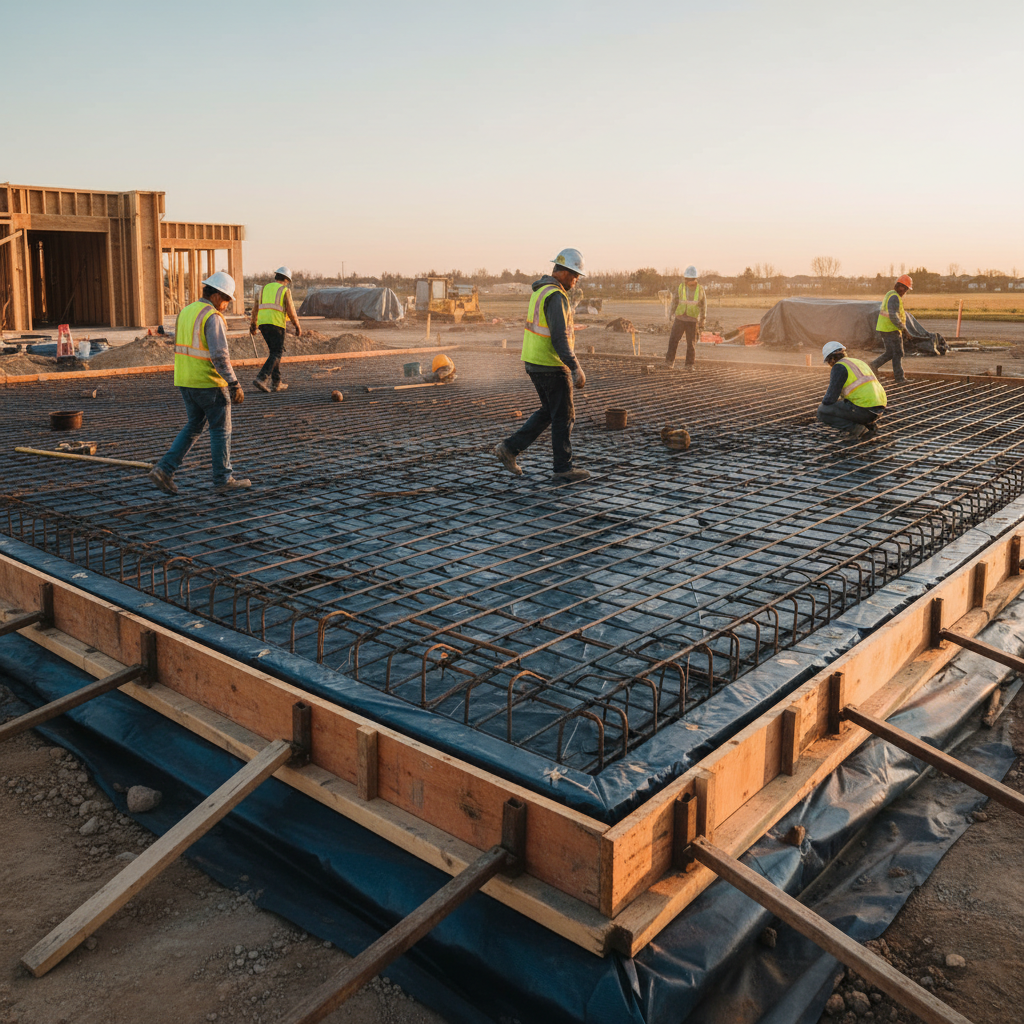
Comparison: welded wire mesh versus deformed bars
Mesh is fast for large, open slabs with light-to-moderate loads; deformed bars offer superior adjustability, crack control, and custom detailing for complex decks. Use the calculator to quantify laps, waste, and crew time for each option and pick the best fit panel-by-panel.
| Criteria | Welded Wire Mesh | Deformed Bars |
|---|---|---|
| Speed of placement | Very fast on open areas | Fast with good tagging |
| Field adjustability | Limited; cut sheets | High; trim and re-tie |
| Crack control at edges | Requires careful laps | Strong with custom bars |
| Material efficiency | Great on rectangles | Great on irregulars |
| Complex penetrations | Slower | Easier |
Our detailing team often mixes both: mesh for big rectangles, deformed bars at edges, openings, and column strips. Your rebar slab calculator should let you compare panels this way before you commit.
Best practices for accurate slab takeoffs
Standardize inputs, validate spacing and cover, and align tags with pour sequence. Break large areas into panels, anticipate openings, and quantify laps at every joint. Finally, translate calculator output into shop drawings that match fabrication and delivery.
- Document the assumptions: list cover, exposure, bar grade, and spacing limits on the first tab of your worksheet.
- Panelize early: split slabs into logical pours; assign tag ranges by panel (e.g., S1xx for Level 1 South).
- Edge/thickening steel: compute extra U-bars, trims, and dowels for thickenings and construction joints.
- Laps and development: include laps in totals; don’t let a 10–15% shortfall sneak in at joints and terminations.
- Accessories: chairs to maintain cover; ties per intersection; caps on exposed dowels for safety.
- Tag clarity: keep bar marks short and unique; put the tag on the drawing right where the crew will stand.
For a deeper refresher on materials, review our reinforcing steel overview and this product page showing stock formats on the metals side of our network: rebar product types.
Tools, resources, and templates
The right tools speed you up: a standardized worksheet, a detailing checklist, and coordinated shop drawing templates. If you’re short on time, Dass Rebar’s in-house estimating and detailing can turn around compliant takeoffs and fabrication-ready drawings for Ontario projects.
- Worksheet: tabs for geometry, spacing, laps, and accessories with locked formulas so totals stay consistent.
- Detailing checklist: openings, embeds, edge forms, and construction joint steel noted in one place.
- Shop drawing template: clear bar marks, callouts in imperial/metric, and a title block that references pour sequence.
- Delivery plan: tags grouped by panel; truck sequence matched to crane access and pour windows.
- Call in help: our rebar supply team can estimate, detail, fabricate, and deliver—end to end—so you keep focus on schedule and safety.
If you want to understand framing interactions around your slab, here’s a useful background guide to complementary systems: metal framing systems.
Case studies and worked examples
Use the calculator to quantify panels, spacing, and laps, then map tags to pours. These mini case studies mirror common Ontario scenarios—a fast way to sanity-check your own slabs before ordering steel.
Example 1: warehouse slab-on-ground (single mat)
- Geometry: 120 ft × 80 ft × 6 in, few penetrations.
- Reinforcement: mesh 6 × 6 × 6/6 for the field, 10M bars @ 12 in o.c. around dock edges.
- Calculator notes: set sheet laps by manufacturer width; add 10M U-bars at thickenings; compute chairs and ties.
- Output: tags bundled for two pours; delivery scheduled one day apart to match crew availability.
Example 2: podium deck (double mat over supports)
- Geometry: 220 ft × 140 ft varying 8–10 in thickness; multiple column lines.
- Reinforcement: 10M @ 12 in o.c. bottom mat; 15M top mat over supports in column strips; trims at edges.
- Calculator notes: separate column/middle strips; assign negative steel over supports; stagger laps; add bars around openings.
- Output: bar marks grouped by strip and pour; shop drawings issued for engineer review.
Example 3: parking structure ramp (variable spacing)
- Geometry: 16 ft lane width; slope 6–8% with tight edges.
- Reinforcement: 10M–15M variable spacing; extra transverse bars near transitions; dowels at joints.
- Calculator notes: extra steel at curbs; lap checks at grade breaks; avoid congestion near drains.
- Output: bend schedule and trims called out with clear stationing on drawings.
Example 4: light commercial slab with vapor barrier
- Geometry: 90 ft × 60 ft × 5 in; vapor barrier and insulation below.
- Reinforcement: 10M @ 15 in o.c. field; 10M @ 12 in o.c. near openings; chairs sized to maintain cover.
- Calculator notes: confirm chair type to protect barrier; include caps on any exposed dowels.
- Output: two trucks, morning deliveries; tags S1xx and S2xx matched to pours.
Want step-by-step footing guidance too? See our field-ready guide on footing steel details.
Pricing factors (no dollar amounts)
Budget is shaped by bar size and spacing, total weight, bends, delivery sequence, and coatings. The calculator clarifies these drivers so you can value-engineer panel by panel without guessing—and issue a takeoff that fabrication and delivery can hit reliably.
- Format choices: mesh vs bars change tying time and waste; deformed bars flex at penetrations and edges.
- Complexity: more bends and trims add handling; simple panels place faster and cleaner.
- Coatings: epoxy-coated rebar adds corrosion resistance for harsh exposures and deicing environments.
- Logistics: tight jobsite access may drive smaller, more frequent deliveries aligned to crane/crew windows.
- Schedule: compressed timelines increase coordination needs; plan submittals and approvals early.
Discuss goals with our estimating team and we’ll align reinforcement choices and sequencing to meet schedule and performance targets across Ontario projects.
Quality, compliance, and field checks
Your slab calculator should embed quality checks: cover, spacing, laps, negative steel over supports, and edge conditions. Clear shop drawings and tagged bundles translate those checks into faster inspections and safer, better pours.
- Cover: maintain specified cover—often higher over soil contact and near harsh exposures.
- Spacing: stick to maximum spacing for distribution and crack control; reduce near edges and openings.
- Laps and development: include at all joints and terminations; stagger to avoid congestion.
- Safety: rebar caps on exposed dowels; manage trip hazards during layout and tying.
- Documentation: as-built markups back to the model or drawings after placement.
Need corrosion resistance for deicing or saline exposures? Our team stocks epoxy-coated options and coordinates shop drawings so coated and black bars are clearly distinguished in the bundle and on the plan.
Delivery and logistics: keep pours moving
Bundle by pour, tag clearly, and schedule trucks to match crane and crew availability. Precision logistics are as important as a perfect takeoff—especially when multiple trades share the deck or site access is tight.
- Bundle by panel: avoid mixed tags; one panel per bundle simplifies placement.
- Sequence trucks: first truck equals first panel; no reshuffling on deck.
- Coordinate cranes: align picks with truck arrival; avoid idle time during layout.
- Weather windows: plan around wind, heat, and precipitation; protect steel and vapor barriers.
Our dedicated trucking fleet supports just-in-time runs across the GTA and Ontario, minimizing on-site stockpiles and helping you keep the deck clear and safe.
Need a fast, compliant takeoff?
If time is tight, send us your slab drawings. We’ll produce an estimating-grade takeoff, aligned shop drawings, and a fabrication-and-delivery plan tailored to your pours—so crews spend time placing steel, not hunting for tags.
Soft CTA — Dass Rebar can handle estimating, detailing, fabrication, delivery, and on-site assembly. One coordinated handoff. One predictable schedule. Talk to our team and we’ll slot you into the next fabrication window.
Rebar slab calculator: Frequently asked questions
These short answers cover the questions we hear most in Ontario: when to choose mesh versus bars, how to set spacing, and what to do around openings and edges. Use them as a pre-pour checklist alongside your calculator worksheet.
How do I choose between welded wire mesh and deformed bars for a slab?
For large, open areas with light-to-moderate loads, mesh is fast and efficient. For complex decks, edges, and penetrations, deformed bars provide better adjustability and crack control. Many projects mix both—mesh in the field, bars at edges and column strips.
What inputs do I need to start a rebar slab calculator?
Have slab length, width, thickness, exposure/corrosion class, clear cover, reinforcement format, and any openings or edge thickenings. If you’re using bars, select initial spacing (e.g., 12–18 in o.c.) and plan laps and staggering at construction joints.
How should I handle reinforcement around openings?
Reduce spacing or add bars around the perimeter of each opening, extend reinforcement beyond corners to control cracking, and keep cover consistent. Update your calculator totals for these trims and verify they’re shown clearly on the shop drawings.
Do I need epoxy-coated rebar in my slab?
Use epoxy-coated reinforcement when slabs are exposed to deicing salts, marine air, or other corrosive conditions. For interior or low-exposure slabs, black bar often suffices. Follow project specs and keep coated and uncoated bars clearly identified.
What’s the fastest way to cut waste on slab steel?
Panelize the slab, standardize spacing, and tag by pour sequence. Include laps in the calculator totals, call out trims and U-bars at edges, and coordinate just-in-time deliveries. Crews place faster when bundles match the exact panel they’re standing on.
Key takeaways
Standardized inputs, smart panelization, and clear tagging turn a rebar slab calculator into saved time and fewer headaches. When outputs match shop drawings and delivery, crews spend less time searching and more time placing steel—so your pour hits its window.
- Start with complete inputs: geometry, cover, exposure, and openings.
- Pick the right format per area: mesh for fields, bars for edges/complex zones.
- Panelize and plan laps early; don’t forget trims and U-bars at edges.
- Tag by pour sequence and schedule trucks to match crane/crew windows.
- Leverage Dass Rebar’s estimating, detailing, and delivery to tighten handoffs.
Conclusion and next steps
A disciplined rebar slab calculator process aligns estimating, detailing, fabrication, and delivery. It cuts waste, reduces rework, and keeps pours on time. If you need support, our Ontario-based team can turn drawings into tagged bundles and a delivery plan—fast.
- Download or build a standardized worksheet for geometry, spacing, and laps.
- Run a quick panel-by-panel comparison of mesh versus deformed bars.
- Align tags with pour sequence; lock delivery windows early.
- When timelines are tight, loop in Dass Rebar for estimating, detailing, fabrication, and on-site assembly.
Ready to move? Book a quick consultation for your next slab in 370 New Enterprise Way or anywhere across Ontario. We’ll help you get from drawings to pour day with fewer surprises.